01
A new format.
Same good idea.
Images, videos, audio, and documents. Pick the format you need from a wheel that appears right where you're working.
 orbitly.
Get Orbitly
Convert images, video, audio and documents between 40+ formats. Right at your cursor.
Free, private and offline: your files never leave your PC.
All the useful things you do with files.
Without breaking your stride.
Images, videos, audio, and documents. Pick the format you need from a wheel that appears right where you're working.
Resize a photo. Compress a video. Trim a clip. Keep the useful part, and save a new copy alongside your original.
RESIZE / COMPRESS / CROP / TRIM / COMBINE TO PDFChain operations into a preset. Assign a shortcut. Let a watch folder take care of the files that arrive next.
PRESETS / WORKFLOWS / WATCH FOLDERSOrbitly is a free offline file converter for images, video, audio and documents.
Everything below runs on your Windows PC.
*HEIC output needs the free Windows HEVC extension. iPhone photos come out the right way up.
Compress to fit email or chat limits, or drop to 1080p, 720p or 480p.
Set bitrate and strip metadata in Conversion Studio.
Word, Excel, PowerPoint and OpenDocument files convert through Microsoft Office when it is installed.
Online converters make you upload, queue and download again.
Orbitly skips all three.
Photos, contracts and recordings stay on your PC. Nothing is sent to a server, so nothing can leak from one.
Convert a 4 GB video or a folder of 500 photos. Speed depends on your PC, not on someone else’s server.
No account, no watermark, no daily limit and no ads. Open source under the MIT licence.
On a plane, on a metered connection or behind a strict firewall: conversion never needs a network.
No extra tabs. No upload queue.
Just your files and a familiar gesture.
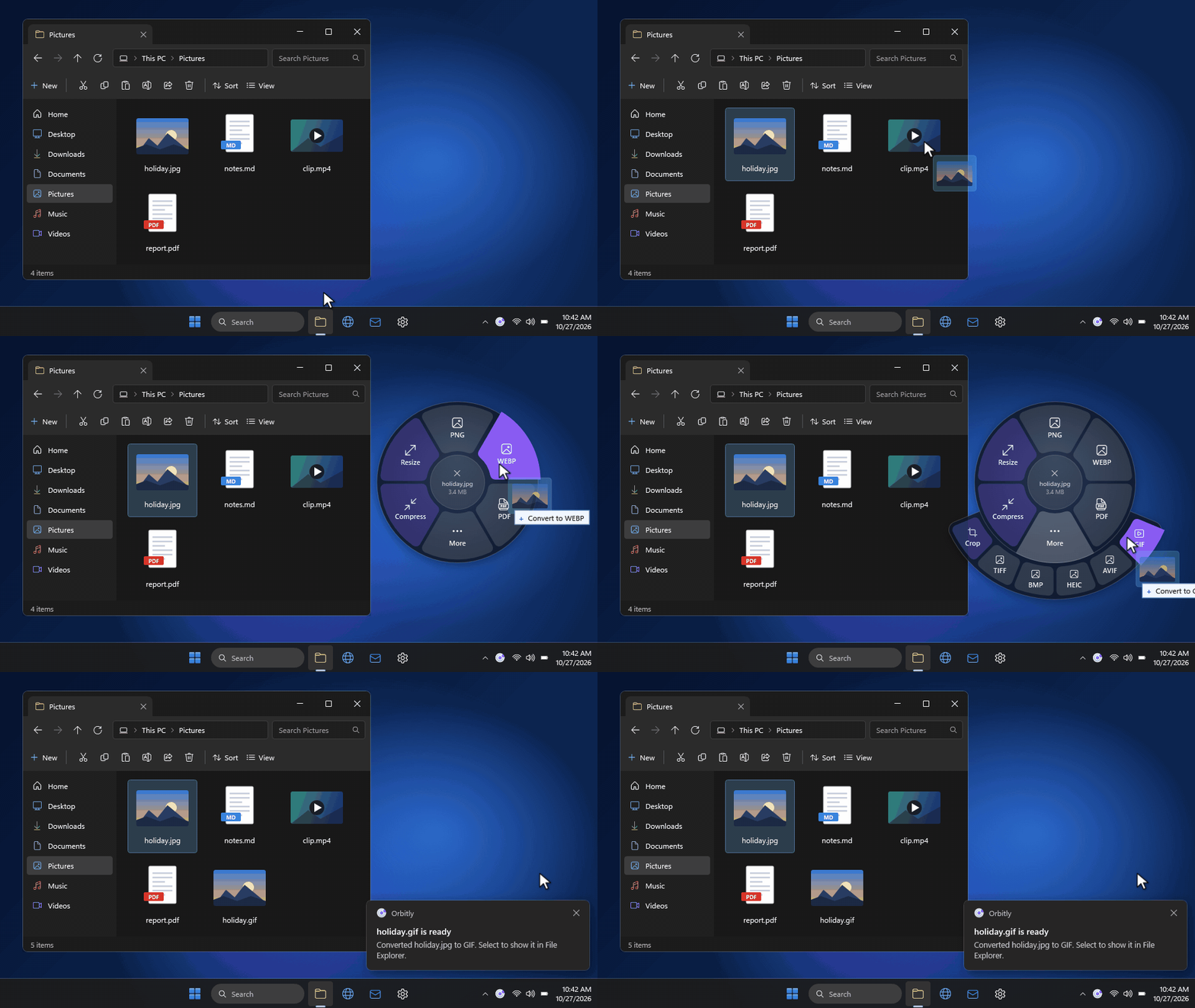
Start dragging a file in File Explorer.
Tap Shift or right-click while dragging.
Let go over a format. Orbitly creates a new copy.
More of a keyboard person?
Open the wheel with selected files.
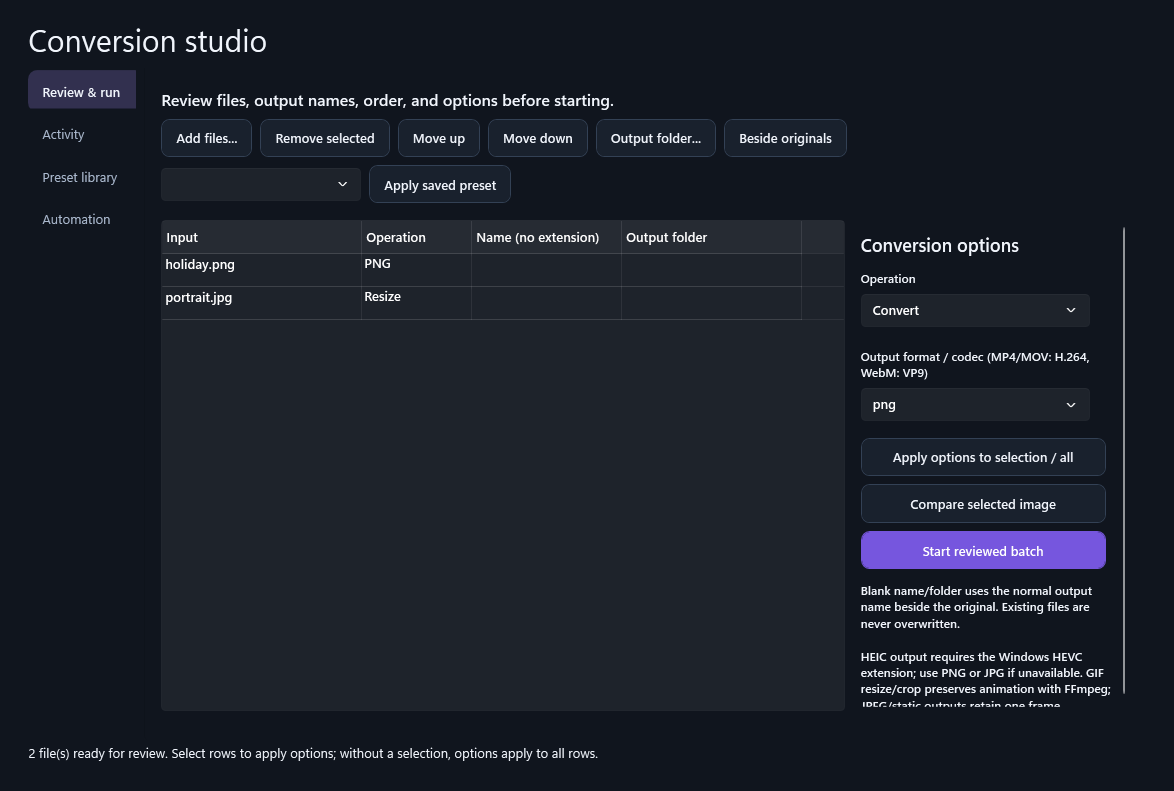
Bring a whole batch into Conversion Studio. Review the names and destinations, compare image results, and keep an eye on every job.
A calmer way to work with your files.
Built for Windows. Made to stay out of the way.
Version 0.6.1 · 64-bit
Installer coming soonUnsigned release. Windows may show an unknown publisher. Verify the SHA-256 below before installing.
The Windows installer is being prepared. A verified download will appear here when the release is published.
Yes. Orbitly is free to download and use, with no sign-up, no watermarks, no trial limits and no ads. It is open source under the MIT licence.
Yes. Every conversion runs on your own PC, so Orbitly works without an internet connection and never uploads your files to a conversion service. Only the optional update check contacts the release host.
Orbitly opens more than 40 formats. Images: HEIC, HEIF, AVIF, JPG, PNG, WebP, GIF, BMP, TIFF, ICO and SVG to PNG, JPG, WebP, AVIF, HEIC, GIF, BMP, TIFF or PDF. Video: MP4, MOV, MKV, AVI, WebM, WMV and M4V to MP4, WebM, MOV, GIF or MP3. Audio: MP3, WAV, FLAC, OGG, M4A, AAC, WMA, Opus, CAF and AIFF to MP3, WAV, FLAC, OGG or M4A. Documents: PDF to PNG, JPG or TXT; Markdown, HTML and TXT to PDF; and, with Microsoft Office installed, Word, Excel and PowerPoint files to PDF.
Install Orbitly, start dragging the HEIC photo in File Explorer, tap Shift or right-click while dragging, and drop it on JPG. A new JPG is saved next to the original. You can also select the files and press Ctrl+Alt+C.
No. Conversions run on your PC. Orbitly doesn't upload your files to a conversion service, so there are no upload size limits or queues. Optional update checks contact the release host.
No. Orbitly writes new files and adds a numbered name when an output already exists. You choose whether results live beside the originals or in another folder.
The release targets 64-bit Windows 10 version 22H2 or later and Windows 11. HEIC output needs the Windows HEVC extension. Office document conversions use Microsoft Office when installed.
Yes. Select files and press Ctrl+Alt+C, open Conversion Studio and choose Add files, or right-click a file and choose Convert with Orbitly. Shortcuts are customizable.
Use the download section above for the current Windows installer and its SHA-256 checksum. The installer is unsigned, so Windows may display an unknown publisher warning: choose More info, then Run anyway.